 Shotnamer
Every screenshot, named by what’s in it.
Shotnamer renames new screenshots automatically the moment you take them, with Apple Intelligence, on your Mac.

Free, with an optional Pro upgrade. Requires a Mac with Apple silicon, macOS 27 or later, and Apple Intelligence turned on.
How it works
The file name tells you what it is, who it’s from and what it’s about. Numbers and dates only go into a name if the screenshot actually shows them.
-
⌘⇧4, as always
A screenshot lands on the desktop.
-
Shotnamer names it
A few seconds later the name says what’s on it.
-
Undo if you like
Don’t like the name? Take it back from the notification.
-
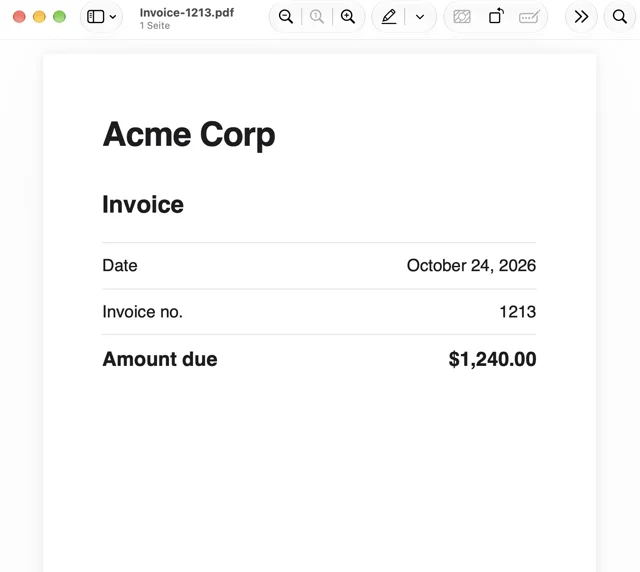
- Before
- Screenshot 2026‑10‑26 at 11.36.04.png
- After
- Invoice Acme Corp 1213 2026‑10‑24.png
-
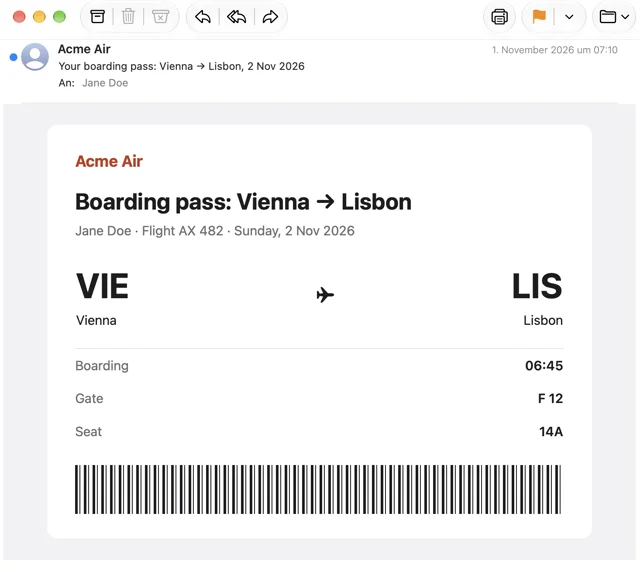
- Before
- Screenshot 2026‑10‑26 at 11.37.27.png
- After
- Ticket Acme Air boarding pass 482 2026‑11‑02.png
-
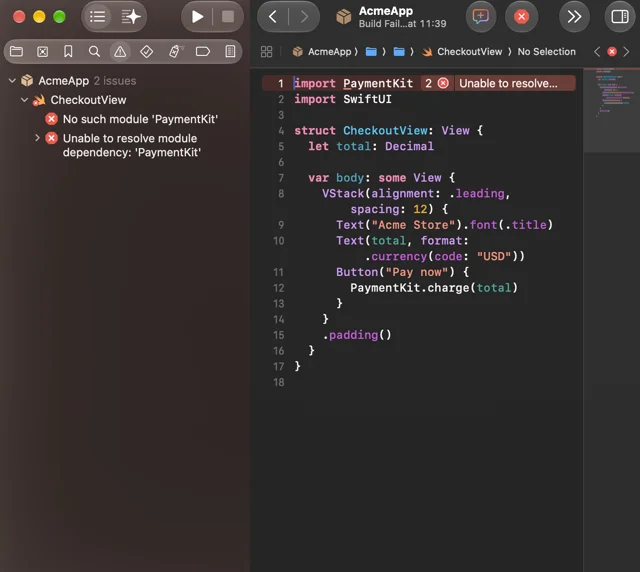
- Before
- Screenshot 2026‑10‑26 at 11.39.08.png
- After
- Error AcmeApp Checkout.png
Nothing leaves your Mac.
Apple’s text recognition reads the screenshot and Apple’s on-device model suggests the name. Screenshots never leave your Mac; Shotnamer has no network access.
App Privacy
Data Not Collected
- Network access
- None
- Account
- None
- Tracking
- None
- Private Cloud Compute
- Not used
Changed your mind? Undo.
Every rename can be taken back from the notification or the menu bar. Shotnamer remembers the last 100, even after a restart, and a name you don’t like can be changed in place.
Free. Pro if you want more.
Free
$0
for as long as you like
- Automatic names for new screenshots
- One watched folder
- Rename single screenshots from the menu
- Undo for every rename
Pro
$14.99
once, or $9.99 per year with a 14-day free trial
Launch price until November 28, 2026, then $19.99.
- Everything in Free
- Compact names: invoice-acme-corp-1213-20261024
- Date first: 2026-10-24 Invoice Acme Corp 1213, with the date the screenshot shows
- Your own naming pattern: type, source, topic, number, date and capture time in any order, with your own text
- Rename older screenshots in one go
- More watched folders
- Drag a screenshot from the history into a chat, terminal or document
US prices, tax included. The price in your country is shown in the Mac App Store.
From the maker
I built Shotnamer because my desktop was full of “Screenshot 2026-…”.
Thomas Hochbichler, hochbichler.com - IT Services e.U., Weyer, Austria
Questions
How much does it cost?
Shotnamer is free. Pro costs $9.99 per year or $19.99 once (US prices incl. tax, prices vary by country in the App Store). The trial only starts when you start it. If Pro ends, nothing is deleted: names go back to the Readable style and extra folders pause.
Is the free version limited?
No. It names every new screenshot in one folder, with no limit on how many and no end date. Pro adds name styles, your own naming pattern, renaming older screenshots in one go and more folders.
Why is there a yearly plan?
You don’t need it: Pro is also a one-time purchase of $19.99. The yearly plan costs less to start and comes with the 14-day free trial. Shotnamer has no server either way; the Mac App Store handles the purchase.
What do I need?
Requires a Mac with Apple silicon, macOS 27 or later, and Apple Intelligence turned on. With Apple Intelligence off, Shotnamer still works and uses simple names from the largest line of text plus the date.
Do my screenshots leave my Mac?
No. Text recognition and naming run on your Mac and Shotnamer never goes online. It works the same without an internet connection.
Which screenshots does it rename?
New screenshots in the folders you choose. Screenshots that were already there, files in subfolders, screen recordings and PDFs stay as they are. With Pro you can tidy up older ones in one go.
Does it work with CleanShot X and Shottr?
Yes. Both mark their captures as screenshots, so Shotnamer renames new ones just like those from ⌘⇧4, as long as the app saves them to a folder Shotnamer watches. That works for free in one folder; with Pro you add the app’s own folder as another one.
Why does the new name take a few seconds?
With the floating thumbnail on, which is the macOS default, macOS saves the file only after the thumbnail slides away. Shotnamer renames it right after. A screenshot you drag from the thumbnail still has the macOS name. For faster names, press ⌘⇧5, click Options and turn off Show Floating Thumbnail.
What if two screenshots get the same name?
The second one gets “2” added to its name, the third “3”, the way macOS does it. Shotnamer never overwrites a file.
What about screenshots with little or no text?
With fewer than three letters on screen, Apple’s on-device model names the screenshot from the image alone, for example “Photo Mountain Lake”. If it can only tell the kind of image, the screenshot keeps its name. Shotnamer doesn’t make one up.
Can names sort by when I took the screenshot?
With Pro, yes: start your own naming pattern with the capture time, and names begin like “2026‑10‑23 09.43.50”. The Date first style uses the date the screenshot shows, for example an invoice date.
Can a name be wrong?
Yes, like any AI, Apple Intelligence can misread a screenshot. Shotnamer only changes the file name, never the content, never overwrites a file, and every rename can be undone.
Which languages?
English and German. Names and the app follow your Mac’s language: German on a German Mac, English everywhere else.
How do I cancel or get a refund?
Apple handles payment, cancellation and refunds for everything bought in the Mac App Store.
More on the support page · Where your Mac saves screenshots · How to rename screenshots automatically
Try it on your next screenshot.